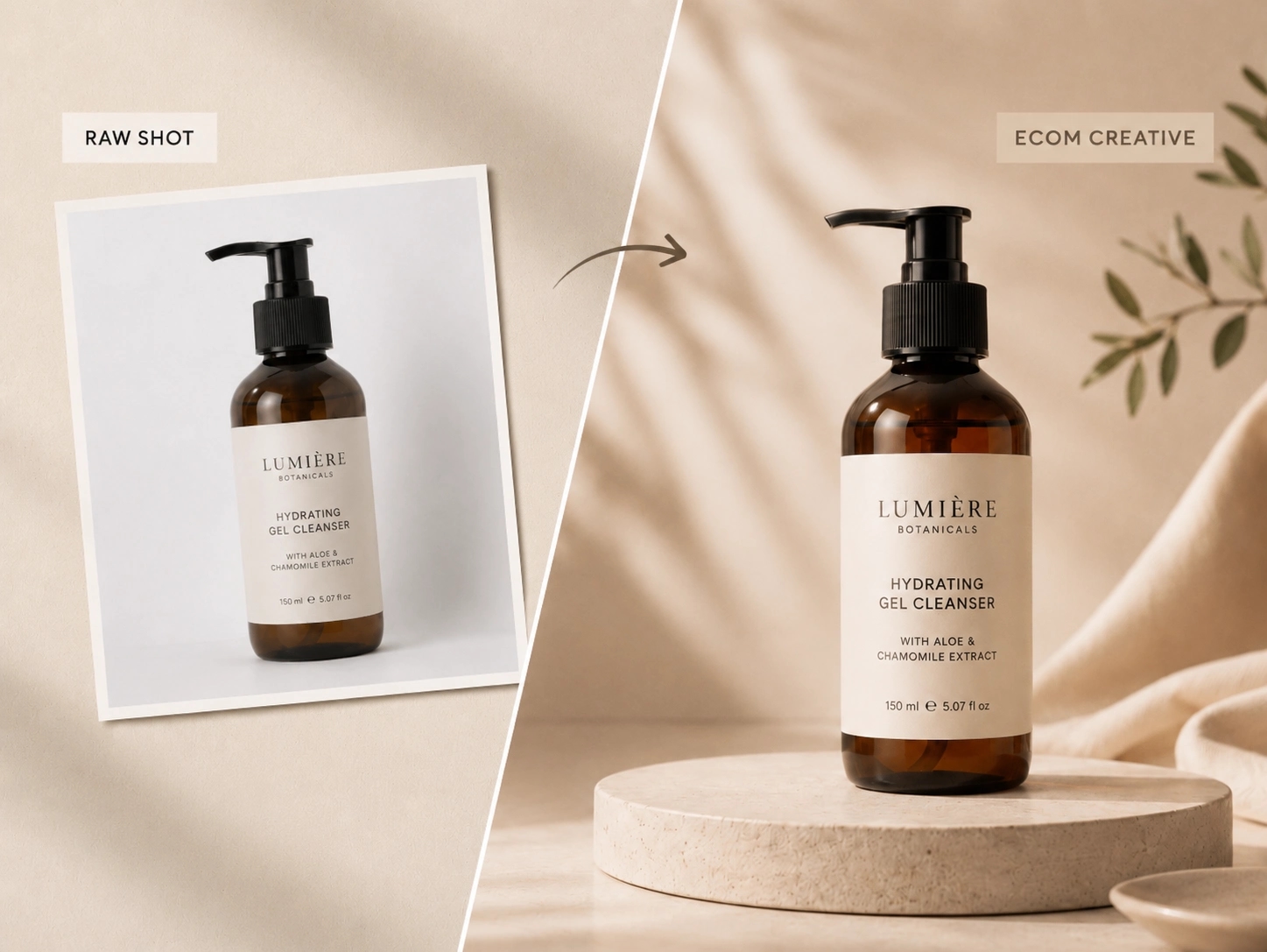



Prompt-Guided Image Transformation
Describe the style, lighting, composition, mood, texture, and subject changes you want, then let the AI transform the image around that direction.
Transform any reference image into a new visual with image to image AI. Upload a photo, product shot, sketch, or artwork, describe the result you want, and generate polished variations for marketing, ecommerce, design exploration, and brand content in seconds.
Image to image AI helps teams create new visuals from existing images without rebuilding every concept from scratch. Use one source image to explore more styles, campaign directions, and production-ready outputs across multiple creative workflows.
Describe the style, lighting, composition, mood, texture, and subject changes you want, then let the AI transform the image around that direction.
Use a source image to preserve important structure, identity, product shape, or composition while generating a fresh visual result.
Generate multiple visual directions from one source image so you can compare looks, concepts, and campaign-ready variants faster.
Create outputs that support ecommerce, advertising, social content, brand publishing, and design exploration from the same image workflow.
Use image to image AI to restyle photos, convert sketches, refine portraits, and explore alternate visual treatments with less manual editing.
Produce visuals for square social posts, vertical portraits, widescreen banners, landing pages, posters, and campaign assets.
The strongest image to image pages do not stop at generic claims. They show how the tool fits into real production workflows, from ecommerce and advertising to portrait enhancement and sketch conversion.
Start with a simple product photo and use image to image AI to generate sharper ecommerce assets, mood-driven campaign visuals, or lifestyle compositions that feel more polished and commercially usable. This workflow is especially useful when teams need more creative variety without scheduling another shoot for every new concept, season, or audience angle.
Upload a portrait and use prompts to refine lighting, texture, styling, background mood, and visual finish while keeping the subject recognizable. This makes image to image AI useful for profile images, creator content, campaign portraits, editorial looks, and brand storytelling that needs more visual range from a single source image.
Move from rough line work, concept sketches, or draft compositions to fuller visual outputs with color, depth, atmosphere, and more finished art direction. This helps designers, illustrators, and marketing teams explore visual directions faster before investing more time in manual production.
The workflow should feel simple and direct: upload an image, describe the new direction, choose the output format, and generate several options until the result matches your goal.
Start with a portrait, product photo, drawing, illustration, campaign asset, or any image you want to transform.
Describe the style, mood, lighting, composition, edits, or output direction you want the image to image AI generator to follow.
Select the aspect ratio or output shape that fits your target use case, whether that is social, ecommerce, ads, editorial, or brand publishing.
Create several directions, review what works best, and keep refining until the output matches your visual brief or content need.
Image to image AI supports a wide range of commercial, creative, and editorial workflows where an existing image needs to become a stronger or more specific visual asset.
Improve lighting, texture, background mood, and presentation quality while keeping the original face or subject recognizable.
Turn basic product photography into cleaner catalog images, lifestyle scenes, launch creative, and campaign-ready ecommerce visuals.
Create multiple campaign directions from one source image so teams can test hooks, moods, layouts, and audience angles faster.
Move from rough sketches and concept drawings to fuller, more polished visuals with color, depth, and clearer art direction.
Use image to image AI to restore blurry, faded, damaged, or low-detail images into clearer results for reuse and publishing.
Refresh one source image into channel-ready visuals for social content, landing pages, newsletters, ads, and launch materials.
Answers to common questions about prompts, reference images, style transfer, product photos, consistency, and getting better generation results.
Image to image AI is a workflow that transforms an existing image into a new result using prompts, settings, and the source image as visual guidance.
You upload a reference image, describe the direction you want, choose output settings, and generate new image variations that build on the original visual structure.
You can restyle photos, improve portraits, refine product visuals, convert sketches into finished images, explore ad variations, and refresh brand content.
It is designed to use the uploaded image as a reference, so it can preserve important identity, structure, and composition cues, especially when the prompt is clear.
Yes. It is useful for improving product presentation, creating lifestyle scenes, generating campaign variants, and adapting product visuals for different channels.
Yes. Sketch to image workflows are a strong use case for image to image AI because they let you keep the original structure while adding color, depth, and style.
The best prompts clearly describe what should change and what should stay the same, including style, lighting, composition, texture, mood, and intended use.
Common image formats such as JPG, PNG, GIF, and WebP are typically supported, making it easy to work from product photos, portraits, and reference artwork.
Use a clear source image, keep the prompt specific, avoid conflicting directions, and generate multiple versions to compare which one best preserves the elements you need.
Use image to image AI when you want to explore multiple visual directions quickly, restyle an image, generate more variants, or move faster than a manual editing workflow allows.